

What is a Knowledge Graph?
A knowledge graph is a network of entities (people, organizations, projects, products, concepts) and the relationships between them. Instead of treating each document as isolated text, Cortex understands the underlying structure of your information. Think of it this way: Semantic search finds documents that mention similar concepts. A knowledge graph understands how those concepts actually relate. When you search for “Project Phoenix budget”, semantic search finds documents containing those semantics. The knowledge graph knows that Sarah Chen leads Project Phoenix, which depends on the Authentication Service, was approved by the Engineering VP, and has a Q2 deadline—providing rich relational context that flat search simply cannot capture.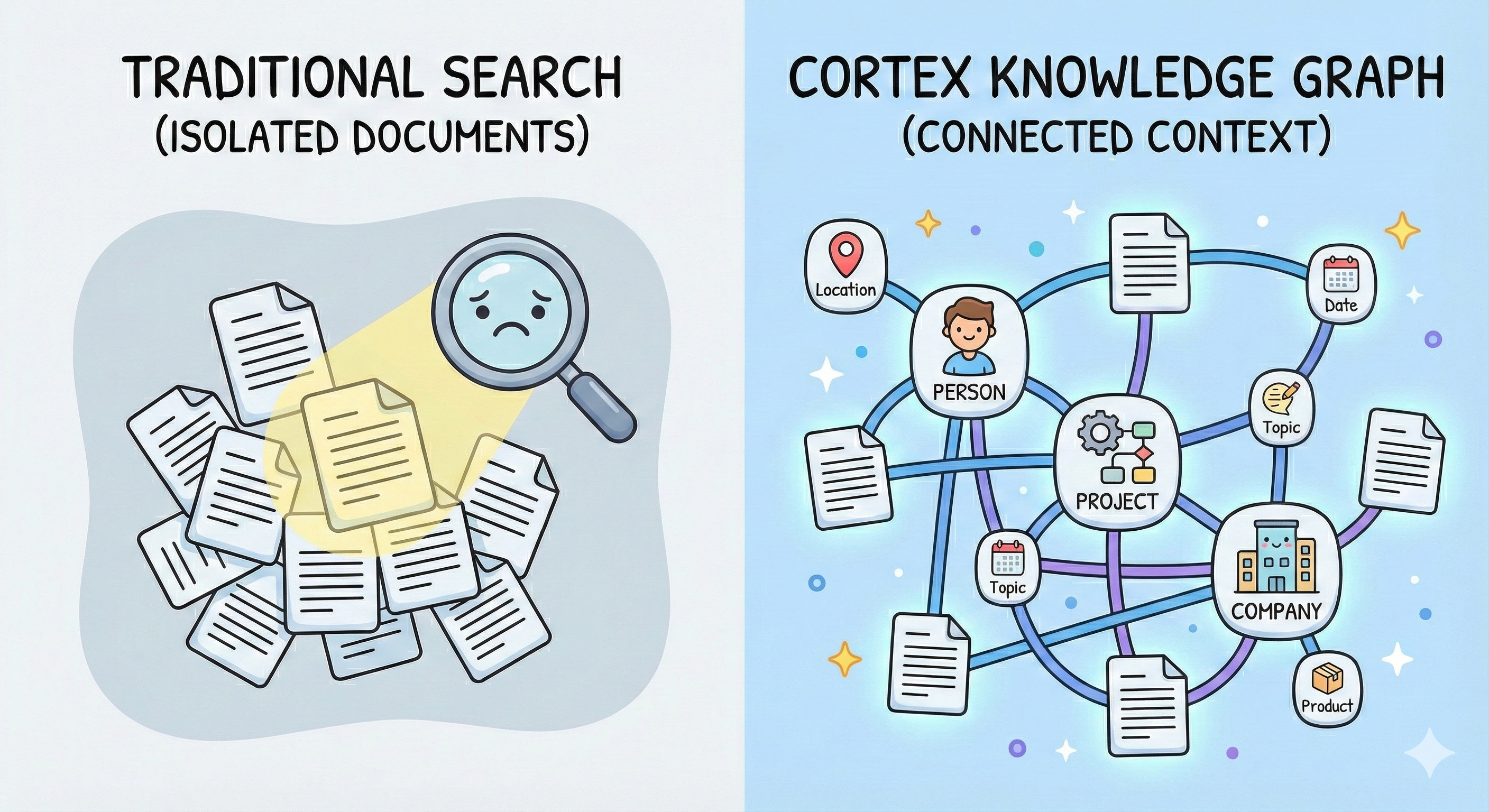
How It Works
Automatic Entity Extraction
When you upload content to Cortex, our system automatically:- Identifies entities in your documents (people, organizations, projects, products, technical terms, etc.)
- Extracts relationships between entities with rich contextual information
- Builds a connected graph that captures how everything relates
- Updates dynamically as you add more content
Zero Configuration Required: Knowledge graphs are built automatically for all content you upload. There’s nothing to set up or configure.
Intelligent Entity Disambiguation
Cortex automatically resolves entity ambiguity using contextual understanding. Consider the name “Mercury”—it could refer to a team member’s name, a customer company, a project codename, or the chemical element. Cortex disambiguates entities by analyzing:- Surrounding context: What’s being discussed when the entity is mentioned
- Source type: Whether it’s from an email, document, meeting note, or support ticket
- Unique identifiers: Email addresses, employee IDs, URLs, or other identifiers that definitively identify entities
- Relationship patterns: Who interacts with this entity and in what capacity
Cross-Source Entity Linking
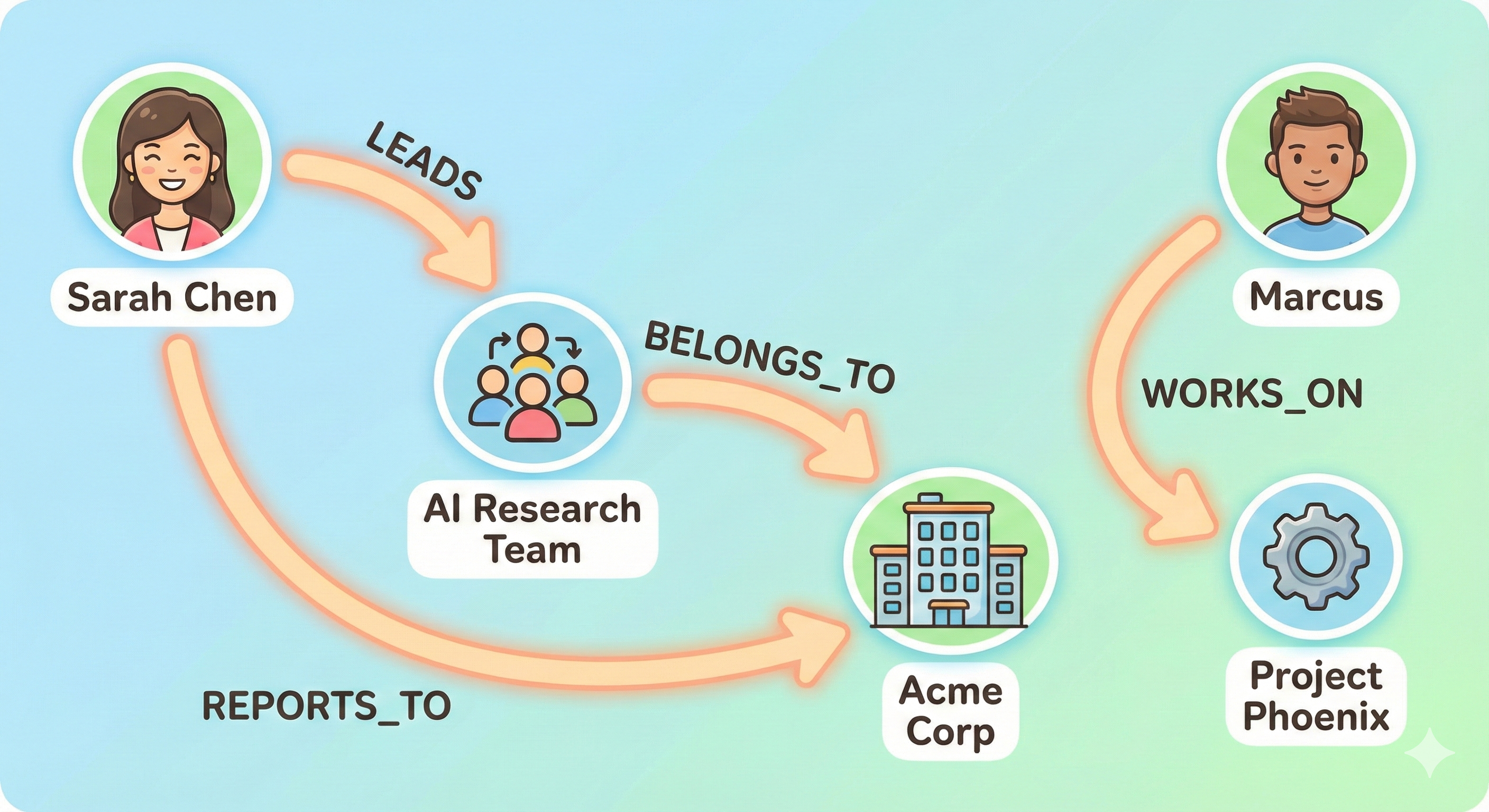
Cortex automatically connects entities across different sources when they share matching identifiers or appear in similar contexts: Automatic Connection Examples:- If two documents mention “John Smith” and both reference the email
[email protected], Cortex merges them into one entity - If a Slack conversation and a project document both discuss “Project Phoenix” with consistent context, they’re automatically linked
- When multiple sources reference the same customer ID or employee number, all information is unified under one entity
Entity Types
Cortex recognizes various entity types including:- People: Team members, customers, stakeholders
- Organizations: Companies, departments, teams
- Projects: Initiatives, products, features
- Technical Terms: APIs, error codes, system components
- Concepts: Business processes, methodologies, frameworks
- Name: The entity’s identifier
- Type: What kind of entity it is
- Namespace: Contextual categorization (e.g., “employees”, “projects”, “customers”)
- Relationships: Connections to other entities with detailed context
Relationship Context
For every relationship between entities, Cortex captures:- The relationship type: “works for”, “reports to”, “depends on”, “caused by”
- Rich context: Detailed information about how and why entities are related
- Source references: Which documents contain evidence of this relationship
- Temporal details: Time-based information like “last week” or “in 2023”
Automatic Availability
Available Everywhere: Knowledge graph context is automatically included in all search and retrieval responses. You don’t need to make special API calls.
How to Use Graph Context
In Search Results
When you search for information, Cortex automatically enhances results with graph context: What you get in each search result:chunks[].graph_triplet_ids: IDs linking to specific triplets ingraph_relations.chunk_tripletsgraph_relations.entity_paths: Multi-hop paths connecting entities from your query—often provides complete context for complex questionsgraph_relations.chunk_triplets: Individual triplets mapped by ID, referenced from each chunk
Understanding the Response Structure
Entity Paths (graph_relations.entity_paths)
Multi-hop paths connecting entities from your query. Each path contains a combined_context summarizing the full relationship chain—this often provides all the context you need for complex, multi-hop questions.
When to use: For questions like “How is X related to Y?” or “Who works with the founder?”—the combined_context gives you a ready-to-use summary.
Chunk Triplets (graph_relations.chunk_triplets)
A mapping of triplet IDs to individual entity relationships. Each chunk references its triplets via graph_triplet_ids.
When to use: When building context per-chunk for your LLM. Use a Set to track seen triplet IDs and avoid duplicating context across chunks.
Practical Applications
Building Context for Your LLM
When passing the response to an LLM, use a Set to deduplicate triplet context across chunks:- JavaScript
- Python
Quick Access to Multi-Hop Context
For complex questions,entity_paths often provides everything you need:
- JavaScript
- Python
Key Benefits
- Deeper Understanding: Your AI doesn’t just match keywords—it understands how concepts, people, and projects relate to each other.
- Richer Context: Every answer is informed by the broader context of relationships, not just isolated facts.
- Better Relevance: Search results include not just matching documents, but related entities that provide additional useful context.
- Automatic Maintenance: The graph updates as you add content, maintaining an always-current view of your information landscape.
- Privacy & Isolation: Each tenant’s knowledge graph is completely isolated, ensuring data privacy and security.
Use Cases
- Customer Support: Understand relationships between error codes, affected systems, and past solutions to provide faster, more accurate support.
- Sales Enablement: Connect prospects with relevant case studies, team members, and product capabilities based on relationship patterns.
- Research & Discovery: Help users explore connections between research papers, authors, methodologies, and findings.
- Project Management: Track relationships between team members, projects, dependencies, and deliverables automatically.
- Onboarding: Help new team members understand organizational structure, project relationships, and key stakeholders.
Best Practices
Make the Most of Graph Context
For search results:- Use
chunk_tripletsviagraph_triplet_idsto show entities mentioned in each chunk - Display relationship information to help users understand context at a glance
- Use
entity_paths.combined_contextfor multi-hop questions—it’s often all you need - Deduplicate
chunk_tripletswith a Set when building per-chunk context
- Create “related entities” sidebars using triplet data
- Build navigation features that follow relationship links
- Use entity mentions to create automatic cross-references
Understanding Graph Quality
The knowledge graph gets smarter as you add more content:- More documents = More complete relationship networks
- Detailed content = Richer relationship context
- Clear writing = Better entity extraction accuracy
Privacy Considerations
- Knowledge graphs are tenant-isolated by default
- Each tenant’s graph only contains entities from their own content
- Sub-tenants can have their own scoped graphs for additional organization
Getting Started
Knowledge graphs work automatically—just start using Cortex’s search and retrieval endpoints:- Upload your content using any Knowledge Ingestion endpoint
- Use Search or Q&A via Search or Q&A endpoints
- Access graph context in
graph_relations.entity_pathsandgraph_relations.chunk_triplets - Enhance your UI by displaying entity relationships alongside results
Technical Details
For developers interested in the underlying structure:Each relationship in the graph stores multiple “evidences” from different documents, allowing the system to:
- Track how relationships evolve over time
- Provide multiple sources for each connection
- Weight relationships based on frequency and relevance
- Update relationships as new information arrives
FAQ
-
Do I need to enable knowledge graphs?
No, they’re automatically built for all content and included in all retrieval responses. -
Can I customize entity extraction?
The system uses advanced AI models optimized for accuracy. Custom extraction rules aren’t currently exposed, but the system handles most use cases automatically. -
How do I see all entities in my graph?
Use the search endpoints with entity names to explore relationships. A dedicated graph visualization interface may be available in the future. -
Does this work with AI memories?
Yes! AI memories are also processed through the knowledge graph, helping your AI understand relationships in user-specific context. -
What if entity extraction makes mistakes?
The system uses multiple evidences to validate relationships. As you add more content, accuracy improves naturally. -
How is this different from vector search?
Vector search finds semantically similar content. Knowledge graphs understand explicit relationships. Cortex uses both together for optimal results.